




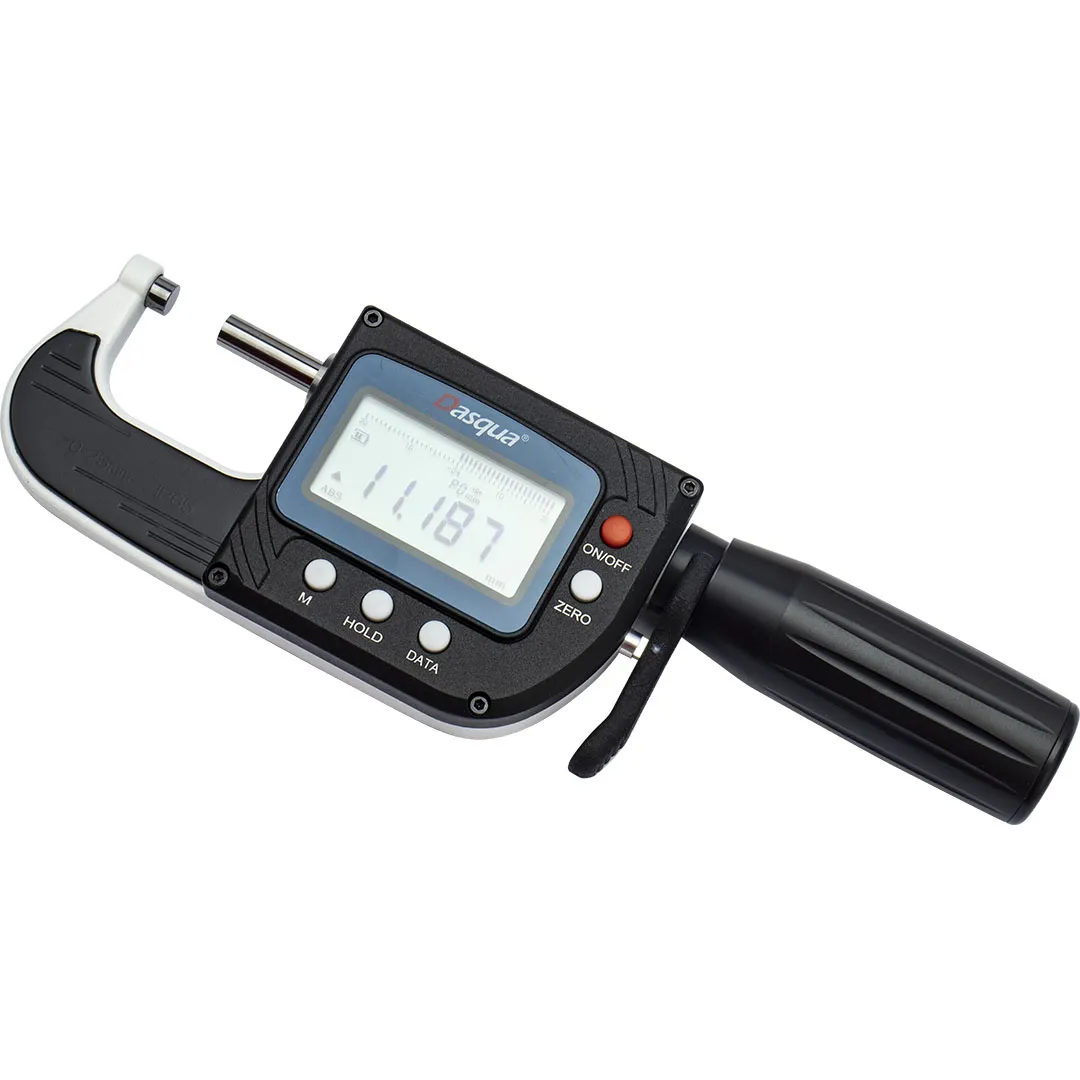
🧭 منوی عملکرد دستگاه (Function Menu)
برای ورود به منوی عملکرد، دکمه “M” را فشار دهید.
این منو شامل ۱۰ گزینه از P0 تا P9 است. هر گزینه کاربرد خاصی دارد:
🔹 P0 – صفحه اندازهگیری (Measurement Interface)
-
در این حالت دستگاه در وضعیت اندازهگیری است.
-
دکمه “ZERO”: ریست (تنظیم صفر).
-
دکمه “DATA”: ارسال داده (Data Transmission).
-
دکمه “HOLD”: نگه داشتن مقدار اندازهگیری (Data Hold).
🔹 P1 – اندازهگیری مقادیر حدی (Extreme Value Measurement)
-
دکمه “ZERO”: جابهجایی بین حالتهای حداکثر (MAX)، حداقل (MIN)، تفاضل (DIFF) و عادی (Normal).
-
دکمه “DATA”: ارسال داده.
-
دکمه “HOLD”: شروع و پایان اندازهگیری مقادیر حدی.
🔹 P2 – تنظیم مقدار از پیش تعیینشده (Preset Value)
-
دکمه “ZERO”: جابهجایی مکان عدد چشمکزن (انتخاب رقم).
-
دکمه “DATA”: تغییر مقدار رقم انتخابشده.
-
دکمه “HOLD”: تعیین علامت مثبت یا منفی مقدار.
🔹 P3 – حد بالای تلورانس (Upper Tolerance)
-
دکمه “ZERO”: انتخاب رقم مورد نظر.
-
دکمه “DATA”: تغییر مقدار رقم انتخابشده.
-
دکمه “HOLD”: تعیین علامت مثبت یا منفی.
🔹 P4 – اندازه استاندارد (Standard Size)
-
دکمه “ZERO”: انتخاب رقم چشمکزن.
-
دکمه “DATA”: تغییر مقدار آن رقم.
🔹 P5 – حد پایین تلورانس (Lower Tolerance)
-
دکمه “ZERO”: انتخاب رقم.
-
دکمه “DATA”: تغییر مقدار رقم انتخابشده.
-
دکمه “HOLD”: تعیین علامت مثبت یا منفی.
🔹 P6 – تغییر واحد اندازهگیری (Metric / Inch)
-
دکمه “ZERO” را فشار دهید تا بین سیستم میلیمتری (Metric) و اینچی (Inch) جابهجا شود.
🔹 P7 – تنظیم خاموش شدن خودکار (Auto Power Off)
-
دکمه “ZERO” را فشار دهید تا حالت خاموشی خودکار را فعال یا غیرفعال کنید.
🔹 P8 – تنظیم عقربه شبیهسازی (Analog Pointer)
-
دکمه “ZERO” را فشار دهید تا عقربه شبیهسازیشده روی صفر تنظیم شود.
🔹 P9 – جهت شمارش (Counting Direction)
-
دکمه “ZERO” را فشار دهید تا جهت شمارش (افزایشی یا کاهشی) تغییر کند.
🔄 بازیابی تنظیمات کارخانه (Factory Reset)
برای برگرداندن دستگاه به تنظیمات اولیه کارخانه:
دکمههای “M” + “ZERO” را همزمان فشار دهید.
توجه: مقادیر از پیش تنظیمشده (Preset values) در این حالت حذف نمیشوند.
📘 راهنمای سریع برای کاربر:
-
دکمه M را بزن تا وارد منوی عملکرد شوی.
-
با هر بار فشار دادن M، از P0 تا P9 جابهجا میشوی.
-
بسته به نیازت (اندازهگیری، تنظیم تلورانس، تغییر واحد و…) از دکمههای
ZERO, DATA, و HOLD طبق توضیحات بالا استفاده کن. -
در پایان، برای بازگشت به حالت عادی، دوباره M را فشار بده تا به P0 برگردی.
انتقال داده
انتقال با سیم:
پس از اتصال کابل داده و انجام تنظیمات مربوطه، با فشار دادن دکمه “DATA”، مقدار نمایش دادهشده فعلی به رایانه بالادستی ارسال میشود.
انتقال بیسیم (سفارشیسازیشده):
در حالت P0، با فشار همزمان دکمههای “M+DATA”، دستگاه بهصورت خودکار قویترین گیرنده بیسیم را جستوجو و به آن متصل میشود. در صورت موفقیتآمیز بودن اتصال، صفحهنمایش نماد “DATA” را به همراه نماد اتصال بیسیم نشان میدهد. اگر اتصال ناموفق باشد، فقط نماد “DATA” نمایش داده میشود.
برای اتصال به گیرنده جدید، به گیرنده مورد نظر نزدیک شوید و از گیرنده قبلی دور شوید، سپس مراحل بالا را تکرار کنید. پس از روشن شدن دستگاه، بهطور خودکار به گیرندهای که پیش از خاموش شدن به آن متصل بوده، متصل میشود.
انتقال بیسیم فعال (سفارشیسازیشده):
با فشار دکمه “DATA” در حالت P0، دستگاه بهطور خودکار به گیرنده بیسیم با قویترین سیگنال متصل میشود. اگر اتصال برقرار شود، صفحهنمایش نماد “DATA” و نماد بیسیم را نمایش میدهد و بهطور مداوم مقدار فعلی را به رایانه بالادستی ارسال میکند. با فشار مجدد دکمه “DATA”، اتصال بیسیم قطع شده و ارسال داده متوقف میشود.
نکات مهم
-
اگر روی میله اندازهگیری گرد و غبار یا آلودگی وجود دارد که حرکت آن را مختل میکند، با یک پارچه خشک و بدون روغن تمیز کنید. از باز کردن دستگاه بدون اجازه خودداری کنید.
-
در صورت وجود آلودگی شدید روی کاور که خواندن صفحهنمایش را دشوار کرده، از پاککننده خنثی برای تمیز کردن آن استفاده کنید. از استفاده از حلالهای فرّار خودداری کنید تا به کاور آسیبی وارد نشود.
-
لطفاً تنها از شارژر تعیینشده توسط شرکت استفاده کنید. هنگامیکه از پورت شارژ یا داده استفاده نمیکنید، درپوش لاستیکی محافظ را قرار دهید تا از ورود گرد و غبار و ذرات جلوگیری شود.
-
هنگام استفاده، از دستگاه به خوبی محافظت کنید؛ از افتادن، برخورد، گرمای زیاد و محیطهای مرطوب دور نگه دارید.
Function menu
Function menu: Press the “M” button to enter the function menu, which has a total of 10 options PO-P9.
PO menu: Measurement interface, press “ZERO” to reset, “DATA” data transmission, “HOLD” data hold.
P1 menu: Extreme value measurement, press “ZERO” to switch between maximum, minimum, difference, and normal modes, “DATA” for data transmission, and “HOLD” to start and end extreme value measurement.
P2 menu: Set preset values, press “ZERO” to move the flashing position, change the value of “DATA” flashing position, and set the positive and negative signs for “HOLD”.
P3 menu: Upper tolerance, press “ZERO” to move the flashing position, change the value of “DATA” flashing position, and set the positive and negative signs for “HOLD”.
P4 menu: Standard size, press “ZERO” to move the flashing position, and the flashing value of “DATA” will change.
P5 menu: Lower tolerance, press “ZERO” to move the flashing position, change the value of “DATA” flashing position, and set the positive and negative signs for “HOLD”.
P6 menu: Switch between metric and imperial systems, press “ZERO” to switch between metric and imperial systems.
P7 menu: Automatic shutdown settings, press “ZERO” to switch between automatic shutdown.
P8 menu: Simulate pointer, press “ZERO” to reset the analog pointer to zero.
P9 menu: Counting direction, press “ZERO” mode to switch counting direction.
Reset function: Use the “M”+”ZERO” keys to restore the factory default settings (preset values remain unchanged).
Data transmission:
Wired transmission: After connecting the data cable and setting it up, press the “DATA” button to send the current display value to the upper computer.
Wireless transmission (customization): In P0 mode, pressing “M+DATA” will automatically search for and connect to the wireless receiver with the strongest signal. If the connection is successful, the screen will display “DATA” and. If the connection fails, only the “DATA” symbol will be displayed. To connect with a new receiver, approach the new receiver and stay away from the receiver that needs to be disconnected, and repeat the above operation. After turning on, it will automatically connect to the wireless receiver connected before turning off.
Wireless active transmission (customization): Pressing the “DATA” button in PO mode will automatically search for and connect to the wireless receiver with the strongest signal. If the connection is successful, the screen will display “DATA” and, and continuously send the current value to the upper computer. Pressing the “DATA” button will disconnect the wireless data connection and stop data transmission.
Notes:
- If there is dust or other dirt on the measuring rod that affects the movement of the rod, please use a dry, non-oily cloth to wipe it clean, and do not disassemble it without permission.
- If there is serious dirt on the cover that affects the display reading, please use neutral cleaner to wipe it off, do not use volatile solvents to prevent damage to the cover.
- Please use the designated charger, when not using the charging/data port, please cover the protective rubber plug to prevent dust and debris from entering.
- Pay attention to protection during use, prevent falling and collision, away from high temperature and humid environment.


نقد و بررسیها
پاکسازی فیلترهنوز بررسیای ثبت نشده است.