



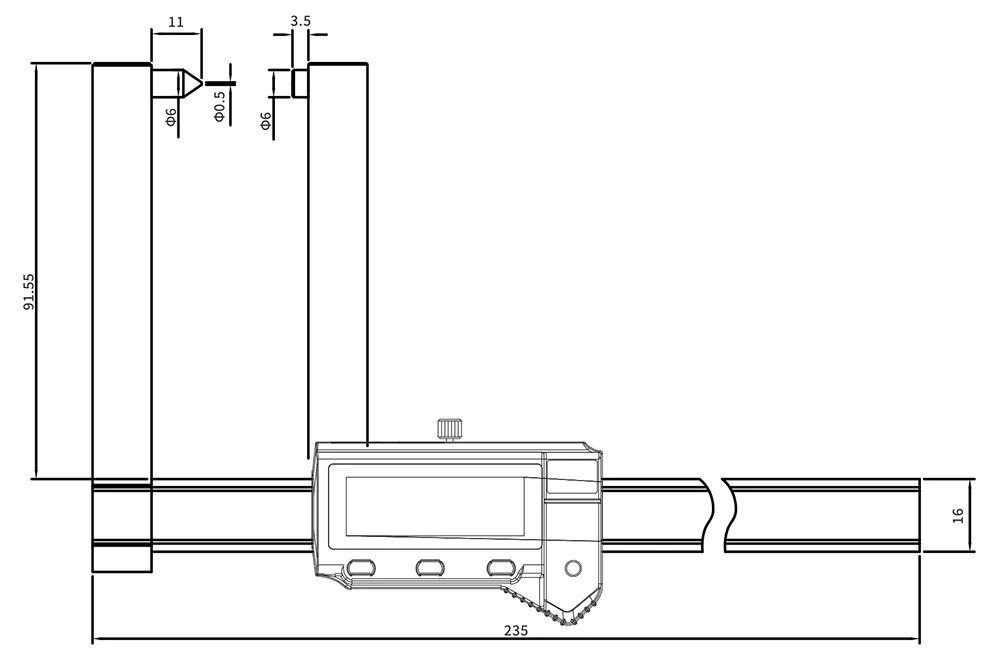
| کد کالا | سایز | دقت | L(mm) | میزان خطا |
| 2240-0006 | 0-150/0-6″ | 0.01/0.0005″ | 235 | 0.05mm/0.002″ |
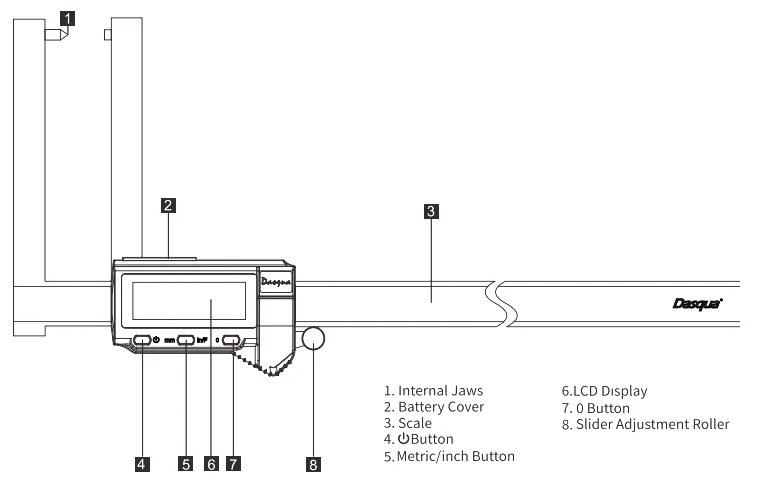
مراحل استفاده:
-
پیچ قفلکننده کولیس را به سمت راست بچرخانید تا شل شود و قفل کولیس آزاد گردد، سپس میتوان قاب متحرک کولیس را با دست حرکت داد.
-
دستگاه را روشن کنید تا بررسی شود که نمایشگر و دکمههای کولیس کار میکنند.
-
سطوح اندازهگیری ابزار را تمیز کنید. فکهای اندازهگیری را با نیروی مناسب ببندید و دکمه 0/0 را بهصورت کوتاه فشار دهید تا دستگاه روشن و صفر شود.
II. نحوه راه اندازهگیری:
-
دکمه روشن/خاموش را فشار دهید یا قاب کولیس را بکشید تا نمایشگر روشن شود.
-
بر اساس نیاز اندازهگیری، دکمه تبدیل واحد میلیمتر/اینچ را فشار دهید تا واحد مناسب انتخاب شود.
-
قاب کولیس را حرکت دهید تا سطوح اندازهگیری دو فک با سطح جسم مورد نظر بهطور کامل تماس پیدا کنند، سپس مقدار نمایش داده شده روی صفحه را بخوانید.
حالت عادی:
زمانی که منبع تغذیه روشن میشود، نمایشگر موقعیت قاب کولیس را که قبل از خاموش شدن در آن قرار داشته، نشان میدهد. موقعیت صفر (مبدأ) کولیس همان موقعیتی است که آخرین بار قبل از خاموش شدن تنظیم شده است.
حالت صرفهجویی در انرژی (در صورتی که مدت زمان خاموشی بیش از ۸ ساعت باشد):
با روشن کردن منبع تغذیه، موقعیت صفر اندازهگیری مطلق کولیس، موقعیت فعلی قاب کولیس در زمان روشن شدن خواهد بود. پس از آن، باید سطوح اندازهگیری تمیز شوند و قاب کولیس بهگونهای جابجا شود که فکها کاملاً بسته شوند. سپس دکمه را به مدت پنج ثانیه فشار داده و نگه دارید تا موقعیت صفر (مبدأ) حالت اندازهگیری مطلق مجدداً تنظیم شود.
- Use steps
- Rotate to right to loosen the locking screw of the caliper and release the lock of the caliper, then
handpushed roller caliper can be moved.
- Turn on to check if the caliper display and keys work.
- Clean the measuring surfaces of the measuring tool. Close the measuring claw with appropriate force,
shortly-press 0/0 to turn on and set.
- II. Measurement operation
- Press the switch or pull the caliper frame to light up the display.
- According to the measurement requirements, press the Metric/inch button to select the measurement
unit.
- Move the caliper frame so that the measuring surfaces of the two calipers are in close contact with the
surfaces of the measured object, and then read the value shows on screen.
- Normal mode: Turn on the power supply, the display shows the position of the ruler frame before turning o ffthe power supply, and the zero position (origin) of the caliper is the last set zero position (origin) before turning o ffthe power supply.
- Power saving mode (shutdown time is more than 8 hours): turn on the power supply, and the absolute measurement zero position (origin) of the caliper is the position of the caliper frame when starting up. After the measuring surface needs to be cleaned, move the ruler frame to close the measuring surface, and long press the key for five seconds to reset the zero position (origin) of the absolute measurement mode.


نقد و بررسیها
پاکسازی فیلترهنوز بررسیای ثبت نشده است.